Developer guide
This page contains information about GEMSEO development and how to contribute to it. The source code of GEMSEO is available on gitlab, this is the place where code contributions shall be submitted. Note also that it is required to accompany any contribution with a Developer Certificate of Origin, certifying that the contribution is compatible with GEMSEO software licence.
We aim to have industrial quality standards for software, in order to:
- have a good and running software,
- be confident about it,
- facilitate collaborative work with the team,
- facilitate distribution to our partners.
To meet these goals, we use best practices described below, these practices are not optional, they are fully part of the development job.
Quick start
First time setup:
-
Clone the repository:
git clone https://gitlab.com/gemseo/dev/gemseo.git -
Install the Requirements.
-
From the root of the git clone, create a development environment:
just install -
Run the checks:
just check -
Configure your IDE:
Environments
We use just for handling the development tasks, be it for coding, testing, documenting, checking, etc. This tool offers a simplified and high level interface to many ingredients used in development, while providing reproducible and isolated outcomes that are as much independent as possible of the platform and environment from which it is used.
All the recipes of just are defined in the file .justfile. The development environment is managed by uv and stored under .venv.
Requirements
Make sure Python 3 is installed, preferably 3.10.
First install uv or make sure your version is up-to-date, then install just with:
uv tool install rust-just
Finally, make sure that graphviz is installed (for rendering graphs).
How to use just
The recipes provided by just and their usage are described in the different sections below. In this section we give the common command line usages and tips.
List available recipes with:
just
Run a recipe named recipe with:
just recipe
The first invocation may take some time to proceed as uv sets up the environment; further invocations will be faster.
Activate the development environment with:
-
On Linux and MacOS:
source .venv/bin/activate -
On Windows:
.venv\Scripts\activate.bat
Activating the environment may be useful for instance to investigate a particular issue interactively.
Some recipes accept additional arguments, for example:
just recipe ARG1 --opt1
See the specific topics below for more information.
By default, recipes run with the Python version defined by the UV_PYTHON environment variable (defaulting to 3.10). To use a different version, set it before the recipe:
UV_PYTHON=3.13 just recipe
Coding
Coding environment
Create a development environment:
just install
This will create an environment under .venv with GEMSEO installed in editable mode. With an editable installation, GEMSEO appears installed in the development environment, but yet is still editable in the source tree.
Note
You do not need to activate this environment for coding into GEMSEO.
Coding style
We use the pep8 convention. The checking and formatting of the source code is done with ruff. A git commit shall have no checkers violations.
All these tools are used:
- either automatically by the git hooks when creating a commit,
- or manually by running
just check.
Warning
ruff moves imports solely used for typing annotations under a TYPE_CHECKING conditional block which is ignored at runtime.
In the case of pydantic models,
the typing annotations are necessary at runtime,
and an error is raised otherwise.
To avoid this,
you must declare the full import path of the parent class of the pydantic model using type annotations
in the runtime-evaluated-base-classes section of the .ruff.toml file.
Coding guidelines
Enumerations
Use StrEnum from the strenum package for creating collections of constants that are compatible with strings. This allows to easily work with non-Python API like REST.
Error messages
Error messages will be read by humans: they shall be explicit and valid sentences.
Logging
Loggers shall be defined at module level and named after the module with:
LOGGER = logging.getLogger(__name__)
This means that logger names track the package/module hierarchy, and it's intuitively obvious where events are logged just from the logger name.
Naming convention
- A factory of
Thing's instances is namedThingFactoryand put in a modulepath.things.factory. - The name of an abstract class is
Base-prefixed, e.g.BaseThingis an abstract class of things. - A module should not include more than one public class.
- A module including a class named
ClassNameis namedclass_name. - In the absence of a better name for a module that does not contain a class, use
utils. - Avoid the use of
__call__; add a method named ascompute_quantityinstead.
String formatting
Do not format strings with + or with the old printf-style formatting: format strings with f-strings first (documentation), or format() otherwise (documentation).
Git
Workflow
We use the gitflow for managing git branches. For the daily work, this basically means that evolutions of GEMSEO are done in feature branches created from the develop branch and merged back into it when finished.
Initial setup
- Create your fork of the gemseo repository on gitlab.com.
- Clone your fork to your local machine:
git clone <url of your fork>
- Go to the directory of your fork.
- Add the reference upstream repository to you fork with:
git remote add upstream git@gitlab.com:gemseo/dev/gemseo.git
- Get access to the IRT CI by contacting a maintainer.
Working on a new feature
- Update your local copy of the upstream repository:
git fetch upstream
- Create a new feature branch on your local clone from the up to date upstream develop branch:
git checkout upstream/develop -b my_new_feature_branch
- Add commits to your feature branch.
- On a regular basis (ideally everyday), keep your feature branch up to date with the upstream evolution of the develop branch so to make the future merge into develop easier:
git fetch upstream
git rebase upstream/develop
- When rebasing turns to be to cumbersome, you may use merge:
git rebase --abort
git merge upstream/develop
- Push your current local feature branch to your fork at least once a day:
git push origin HEAD
- Once pushed, the gitlab CI will run the tests on your branch, you will receive an email notification in case of failure.
Finishing a feature
- When your feature branch is ready to be merged in the upstream develop branch, your branch shall become a merge request (MR).
- If applicable, add a changelog fragment that will be later inserted into the changelog. To do so, create one or more files named after the issue number and kind of change (added, changed, deprecated, fixed, removed or security), for instance
123.fixed.md, inchangelog/fragments. - MR basic information.
- How to create a MR.
- Assign the MR to a maintainer (AntoineD by default) which will handle the choice of the reviewers (discussed during the scrum meeting).
- Set the milestone.
- Set the issue relating or closing the MR, if any.
- If for some reasons the branch of the MR requires more work, the MR may be set to Draft.
- If a review discussion goes beyond the scope of a branch, one or several review threads of a MR may be turned into a new issue to be resolved in a future branch.
- If a review thread has not been resolved by a new commit to the reviewed branch and shall not be dealt with in a new issue, it shall be marked as resolved by the reviewer.
- If changes have been pushed to the branch of a MR, the reviewers shall be notified.
-
When all the MR discussion threads are resolved:
- The reviewers shall approve the MR,
- The MR creator shall ask the branch to be merged.
Reviewing a MR
- You can choose how the changes of the MR branch are displayed.
- You may leave reviews or comments on one or more lines.
- You may make code suggestions that could be committed as is the reviewed branch.
- Once done, you shall submit your review.
- You shall check that your review comments have been addressed, if so you shall mark them as resolved.
- When all the reviews have been resolved, you shall approve the MR.
Git hooks
When a commit is being created, git will perform predefined actions:
- remove the trailing whitespaces,
- fix the end of files,
- check toml, yaml and json files are well formed,
- check that no big file is committed,
- check bad symbolic links,
- check or fix some of the python docstrings formatting,
- fix the Python import order,
- fix the Python code formatting,
- check for Python coding issues (see Coding style),
- fix some of the above coding issues.
- fix outdated Python syntax,
- check the commit message (see Commit message),
- check for forbidden
printusage, - check for misused
loggingformatting, - check for
.mdfiles issues. - check or fix license headers,
- check for docstrings formatting,
- check for docstrings coverage,
Those actions will eventually modify the files about to be committed. In this case your commit is denied and you have to check that the modifications are OK, then add the modifications to the commit staged files before creating the commit again.
Commit message
We use conventional commits for writing clear and useful git commit messages. The commit message should be structured as follows:
<type>(optional scope): <description>

[optional body]

[optional footer(s)]
where:
<type>defines the type of change you are committing- feat: A new feature
- fix: A bug fix
- docs: Documentation only changes
- style: Changes that do not affect the meaning of the code
- refactor: A code change that neither fixes a bug nor adds a feature
- perf: A code change that improves performance
- test: Adding missing tests or correcting existing tests
- build: Changes that affect the build system or external dependencies
- ci: Changes to our CI configuration files and scripts
(optional scope)provide additional contextual information and is contained within parentheses<description>is a concise description of the changes, imperative, lower case and no final dot[optional body]with the motivation for the change and contrast this with previous behavior[optional footer(s)]with information about Breaking Changes and reference issues that this commit closes
You may use commitizen to easily create commits that follow conventional commits. Install it with:
uv tool install commitizen
Run it and and let it drive you through with:
cz commit
Commit message examples:
feat(study): open browser when generating XDSM
fix(scenario): xdsm put back filename arg
Commit best practices
The purpose of these best practices is to ease the code reviews, commit reverting (rollback changes) bisecting (find regressions), branch merging or rebasing.
Write atomic commits
Commits should be logical, atomic units of change that represent a specific idea as well as its tests. Do not rename and modify a file in a single commit. Do not combine cosmetic and functional changes in a single commit.
Commits history
Try to keep the commit history as linear as possible by avoiding unnecessary merge commit. When possible, prefer rebasing over merging, git can help to achieve this with:
git config pull.rebase true git config rerere.enabled true
Rework commit history
You may reorder, split or combine the commits of a branch. Such history modifications shall be done before the branch has been pushed to the main repository.
Tests
Avoid commits that break tests, only push a branch that passes all the tests for py310 on your machine.
Testing
Testing is mandatory in any engineering activity, which is based on trial and error. All developments shall be tested:
- this gives confidence to the code,
- this enables code refactoring with mastered consequences: tests must pass!
Tests writing guidelines
We use pytest for writing and executing all the GEMSEO tests. Older tests were written with the unittest module from the Python standard library but newer tests shall be written with pytest.
Logic
Follow the Arrange, Act, Assert, Cleanup steps by splitting the testing code accordingly. Limit the number of assertions per test functions in a consistent manner by writing more test functions. Use the pytest fixtures or import the GEMSEO ones in a conftest.py file:
from gemseo.utils.pytest_conftest import skip_under_windows
Tests shall be independent, any test function shall be executable alone.
Logging
Do no create loggers in the tests, instead let pytest manage the logging and use its builtin features. Some pytest logging settings are already defined in pyproject.toml.
Messages
The information provided to the user by the error and logging messages shall be correct. Use the caplog fixture for checking the logging messages. Use pytest.raises for checking the error messages.
Skipping under Windows
Use the pytest marker like:
@pytest.mark.skip_under_windows
def test_foo():
Validation of images
For images generated by matplotlib, use the image_comparison decorator provided by the matplotlib testing tools. See tests/post/dataset/test_surfaces.py for an example. When image comparison fails, set the environment variable GEMSEO_KEEP_IMAGE_COMPARISONS such that the result_images directory with the comparisons is available at the root of the repository.
Validation of Plotly figures
For Plotly figures,
use syrupy for snapshot testing.
A snapshot serializes the figure's data structure into an test_{suffix}.ambr file under a __snapshots__ directory in the same directory as test_{suffix}.py;
future runs diff the live output against it and fail on any change.
Add the snapshot fixture to your test:
def test_my_plot(snapshot):
    fig = my_function_returning_a_plotly_figure()
    assert fig.to_json() == snapshot
On the first run, or whenever a plot intentionally changes, generate or refresh the snapshots with:
just test --snapshot-update
Commit the resulting .ambr files alongside the test.
Validation of arrays
For NumPy arrays, use the NumPy testing tools.
Generated files
Tests that create files shall use the tmp_wd fixture such that the files are created in a temporary directory instead of polluting the root directory.
Executing tests
Run the tests with:
just test
You can pass options to pytest directly, for instance:
just test --last-failed --step-wise
To speed up the execution of the tests, you may execute exclusively or skip some of them by using the following pytest marks: - post: tests that post processing compare images - slow: tests that are slow - integration: integration tests
For instance, skip all the post with
just test -m 'not post'
Tests coverage
Get the coverage information with:
just coverage
See pytest-cov for more information.
Documentation
The documentation of the develop branch is available online: develop documentation.
Generating the documentation
The documentation is built with mkdocs. Generate the documentation with:
just doc
Writing guidelines
Documenting classes, functions, methods, attributes, modules, etc... is mandatory. End users and developers shall not have to guess the purpose of an API and how to use it.
Style
The documentation is written in Markdown. For more information, please refer to this introduction to Markdown and these advanced features.
Use the Google Style Docstrings format for documenting the code. This example module shows how to write such docstrings.
Type hints
The type hints are used when generating the functions and methods documentation, they will also be used gradually to check and improved the code quality with the help of a type checker like mypy. See this example module for a typical example.
Functions and methods arguments shall use standard duck typing. In practice, use [Iterable][collections.abc.Iterable] or [Sequence][collections.abc.Sequence] etc... instead of list when appropriate, similarly for [Mapping][collections.abc.Mapping] instead of dict. For *args and **kwargs arguments, use only the value types with no container.
Return types shall match exactly the type of the returned object.
Type hinting may cause circular imports, if so, use the special constant TYPE_CHECKING that's False by default and True when type checking:
from typing import TYPE_CHECKING

if TYPE_CHECKING:
    from gemseo import create_discipline
Line feeds
Use semantic line feeds by starting a new line at the end of each sentence, and splitting sentences themselves at natural breaks between clauses, a text file becomes far easier to edit and version control. You can have a look at the current page's source for instance.
Examples
There are two types of examples in the documentation:
- tutorials: they are used to teach a concept; they can be seen as mini-lessons;
- how-to guides: they are used to answer a specific question; they are intended for users who have mastered the basics.
Use templates for writting tutorials (template_tutorial.py) and how-to guides (template_how_to.py).
Check that the examples run correctly with:
just test -m doc_examples
Versioning
We use semantic versioning for defining the version numbers of GEMSEO. Given a version number MAJOR.MINOR.PATCH, we increment the:
- MAJOR version when we make incompatible API changes,
- MINOR version when we add functionality in a backwards compatible manner, and
- PATCH version when we make backwards compatible bug fixes.
Benchmarking
Use pyperf to create valid benchmark, mind properly tuning the system for the benchmark (see the docs).
Profiling
The Python standard library provides a profiler, mind using it with controlled system like for benchmarking. The profiling data could be analyzed with one of these tools:
- snakeviz
- kcachegrind, after having converted the profiling data with pyprof2calltree
Configure PyCharm
PyCharm is one of the best tools for writing Python code. We provide some configuration files to help configuring it for developing GEMSEO.
Code style
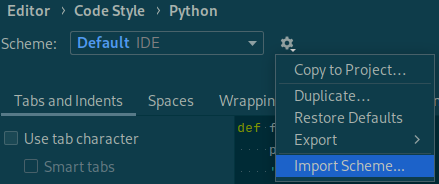
Configure PyCharm to match the code style used by GEMSEO. Download this file, open the PyCharm settings, go to Editor > Code Style > Python and select Import Scheme...:
Check and format
Some tools used by the git hooks can be executed in order to be notified of code issues earlier and avoid having to fix files when creating a commit.
Install the Ruff plugin by opening the PyCharm settings, and searching in Plugins > Marketplace. Then, activate all the options and provide the path to the ruff executable that shall be in the following directory relative to the root of the git clone of gemseo:
- On Linux and MacOS:
.venv/bin/ruff. - On Windows:
.venv\Scripts\ruff.exe.
Warning
For [AutoPyDiscipline][gemseo.disciplines.auto_py.AutoPyDiscipline] functions, ruff will refactor the return line in an incompatible manner. You shall append # noqa: RET504 to the return line.
Configure VSCode
vscode could serve as an alternative to PyCharm. To configure it for developing GEMSEO, we offer the base settings.json and extensions.json, which need to be placed within the local .vscode directory.
Download Configuration Files
settings.json: This file primarily contains Python rules for code style, formatting, debugging, testing, and indexing. You can download it.extensions.json: This file provides useful extension recommendations when browsing the Marketplace. You can download it.
Configuration
Place both downloaded files in the .vscode directory of your project.
Modify settings.json according to your preferences. You can adjust the settings either globally (User parameters) or per project (Workspace parameters).
Extensions
Ensure you install all recommended extensions mentioned in extensions.json. These extensions enhance the functionality and productivity of vscode for Python development.